System Requirement : Android 2.1
 As a Flickr users, you should have FlickrCroid installed in your Android device. To show your best photo shot, to show your honey moon travel, or even to show your lovely baby. It provides a great performance to download photos, manage the photos in the cache folder, and also provide simple way to edit title/description and to add new comments. The interface may not be fancy, but it is definitely friendly.
Main Features :
- Find your and your friend's latest uploaded photos.
- Find all of your and your friends's photosets.
- View your and your friends's photo and title/description/comments.
- Edit the titles & descriptions of your photos.
- Add new comments to your and your friend's photos.
Several features are under development :
- A contact list with their primary photo.
- Upload to Flickr from your local photoset.
- Take photo and upload immediately by a bulit-in camera.
How to install : (This is a Paid app.)
(1)Manually install from the Android Market:
- Go to 'Market' on your Android-powered device.
- Select 'Search'.
- Enter 'FlickrCroid' into the search field.
- Once you've found the 'FlickrCroid' app, touch to install.
- Follow the onscreen instructions to proceed with the installation.
Change log.
20110329-Provide a simple way to edit title/description of your own photos and to add new comments to all your and your friends's photos.
20110313-Press menu in photo browser to switch between multiple and single photo view.
20110305-Improve the performance of retrieving photo image and information from internet.
20110123-Fix the "Sporadic viewing" problem. Photo retrieving should be more stable. Thanks for Mark's comment.
Description :
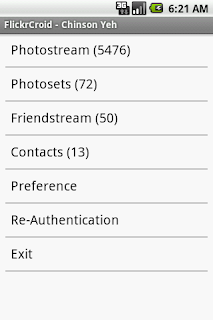
(1) Main Menu
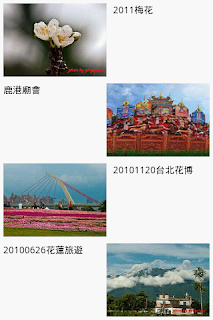
(2) View multiple photos at a time. Use menu to switch to single photo viewer.

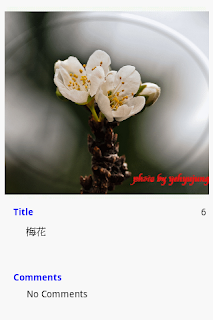
(3) View single photo and its title, description and comments. Use menu to switch to multiple photo viewer, to edit photo title, description and comments, to connect to Flickr website, to save photo to local sdcard : /mnt/sdcard/FlickrCroid/Pictures/.
(4) View and choose the photoset.
(5) Edit title/description of your own photos and add new comments to all your and your friend's photos


 Posts
Posts

